
Technology
- Massive data breach sees credit card details of over 5.6 million victims leaked - here's what we know
- The EU prepares ground for wider data retention – and VPN providers are among the targets
- Taylor Swift's New Documentary Is Reigniting the Magic of the Eras Tour for Me
- Stranger Things season 5, volume 2's trailer teases a character's death and I'm already terrified
- We filled the internet with garbage, and now Slop is the word of the year — nice going, AI

Custom Search
News
- Brian Walshe, who searched for crime tips online, is convicted of his wife's murder
- ACA shoppers face sticker shock as Congress dithers on health care
- Roomba maker files for bankruptcy, weighed down by debt and tariffs
- Trump says Rob Reiner had 'Trump Derangement Syndrome' in post on his death
- 15 killed in mass shooting in Sydney. And, Rob Reiner and his wife found dead
Feed aggregator
Reviews
- I tested Leica's divisive M EV1 — it's easier to the eye, but loses some of that rangefinder soul
- Idea Spectrum Realtime Landscaping Pro 2025 review
- Amadeus review: classical music is Bach and better than ever in Sky's retelling of a tumultuous composer rivalry
- I tested Ring’s new outdoor camera in my garden and was blown away by the picture quality (and high price tag)
- The Bosch Tassimo Finesse Friendly is a super affordable coffee maker, but beware – there's a catch that means it could cost you in the long run
New forum topics
YouTube to lock out under-16s in Australia as controversial social media ban looms
YouTube has confirmed it will comply with Australia's strict new age verification laws, following the likes of Meta and X. Yet, critics are raising alarms over privacy and data security.
Categories: Technology
Foxit PDF Editor review
Editor's note
- Original review date: November 2024
- No major changes
- Prices have slightly risen
Update - November 2025: Every time we go back to Foxit PDF Editor, we're reminded just how good it is, especially when it comes to editing a PDF’s existing text. Being able to link text boxes together so your writing flows from one to the other as you write brings PDF editing as close to working with a word processor as you can get. It's so good, it's worth repeating and praising here once more.
After a re-review, we haven’t noticed any major changes. The app remains smooth and responsive, and is still one of the best out there.
As for its cost, well, inflation affects everything, and you can now subscribe to PDF Editor for $130 a year ($10.83 a month), or Editor+ for $160 ($13.33 a month).
Original review follows.
Editing PDFs can be very important for businesses - and a limited PDF editor will stifle productivity and slam the brakes on otherwise efficient workflows.
Foxit’s PDF Editor sidesteps all of that, and more besides, making it easier to tweak an existing document. No more going back to the software where the file was originally created, performing the changes, exporting it as a PDF, only to discover another problem and go through the whole process again.
We took the latest version of this software out for testing, to see how it compares to the best PDF editors we've reviewed.
Foxit PDF Editor: PricingYou can choose from two subscription services - ‘+’ is aimed more at businesses (Image credit: Foxit)- Flexible pricing with free trials, monthly & annual subscription, and perpetual licenses
Foxit’s PDF editing software comes in two editions: PDF Editor, and PDF Editor+.
PDF Editor is the cheapest option. It’s designed to work on the web and on Desktop computers (be they Mac or Windows), includes an AI assistant, advanced editing capabilities, the ability to convert PDFs to Microsoft formats, it can scans files and OCR them, it can compare two versions of a document to review all differences, and offers the ability to password protect PDFs. You can have this for $110 a year, or $11 when billed monthly.
PDF Editor+ is aimed more at professionals and businesses and as such includes more advanced features, including the ability to sign documents (which includes legally binding signatures), request signatures, and track responses in real time, allows you to redact sensitive information, and grants you access to Foxit on your iOS or Android device. This will cost you $140 a year or $14 a month.
There are no free versions of Foxit PDF Editor, although you can try Editor+ free for 14 days. For alternatives, we reviewed the best free PDF editors.
You can check out Foxit PDF editor by clicking here.
- Pricing: 4/5
- A clean, easy to understand interface
The interface is quite simple, with a row of commands at the top, representing different aspects of the work you wish to carry out, such as ‘Edit’, ‘Convert’, ‘Protect’ and ‘Share’.
Click on any of them and the row of icons beneath it changes to display the tools suited for the selected action. The interface is well organized, only showing you the tools you need when you require them. If you're looking for a less overwhelming alternative to Adobe's Acrobat software, Foxit may serve you very well.
If you just opened the app, you’ll also see some ‘Tool Wizards’ in the middle of the interface, which allow you to quickly access frequently performed actions, namely ‘Edit PDF’ and ‘Merge PDF’.
- Interface & experience: 5/5
- Almost as easy as using a regular word processor
Should you need to make changes to an existing PDF, you need to take a trip to the ‘Edit’ section - which is actually automatically selected once you open a document.
You’ll find your PDF is divided into text boxes, which can be selected, moved around and resized at will. The text contained within one will automatically reflow as you alter its size. This also happens when you alter the content of these boxes.
You might notice that the main body of the document will likely be split up into multiple such text boxes, making editing a bit of a pain, as words won’t automatically flow from one box to another. However, Foxit has solved that problem with its ‘Link & Join Text’ feature.
Select it, then click (in order) the boxes you wish to connect together. Once done, go back to your editing, and you’ll be able to write seamlessly through the boxes.
When it comes to text tools, you have the basics you’d expect from any word processor. You’re able to change the font, its size, color and alignment. Bold, italics, underline, strikethrough, and so on, are also available, as are options to alter character, line and paragraph spacing, and character scale.
Foxit PDF editor pretty much covers most, if not all, the functions you’d need to make your necessary changes. There’s even a built-in spellchecker. It is the most versatile, flexible and extensive PDF editor we’ve yet come across.
- Editing: 5/5
- Convert data from one file format to another
Foxit PDF Editor can also help you convert documents into other file formats, such as Office docs like PDF to Word, PDF to PowerPoint, and PDF to Excel. You can also convert RTF, plain text, HTML and even various image formats. This level of flexibility is great should you need to extract the content of the PDF to create something new based on it.
This conversion process works in the opposite direction too, allowing you to convert files like Word to PDF. You have options to convert from an existing file, from your scanner, based on copied data stored in your computer’s clipboard, or even convert HTML to PDF.
The latter sounded interesting but we encountered some problems: we tried converting www.techradar.com, www.apple.com, and even www.microsoft.com, but we only got various errors for our troubles. It seems it might only work for less complex, less animation heavy, less processing-in-the-background pages.
Regarding the scanner option, it’s great that Foxit PDF Editor can connect directly to your device. You can even choose for the software to automatically perform an OCR pass automatically, enabling you to edit as soon as the process is done.
This OCR software functionality isn’t restricted to the scanning process, meaning that you can use it to convert any scanned PDF in your possession. You’re given two main options: turn the scanned image into a searchable one (meaning you can use the search field to find specific text only), or convert the file to make the text editable. We found the results to be pretty good.
- Conversions: 4/5
- Work as a team, thanks to a long list of annotating tools
As Foxit PDF Editor is aimed at businesses, it stands to reason that you’ll find online collaboration tools. These are located in the ‘Comment’ section.
From there, you and your team are able to highlight text (with multiple colour choices), link said highlighted section to a note, add a free floating note, strikeout, replace, or insert text, draw shapes, and more. There are many options here to make sure other members of your team know exactly which changes need to happen.
- Online collaboration: 4/5
- Keep sensitive information away from prying eyes
Businesses need to protect their information. In certain industries, it’s absolutely imperative to stay compliant with global data laws - with the threat of operational, financial, and reputational damage hanging over any firm that doesn’t treat data security seriously.
There are basic ways to redact information, usually by placing a black box over sensitive data, but if it’s not done right, you can still select, copy and paste what was supposed to be restricted.
Foxit PDF Editor doesn’t work like that.
The tools for this job reside in the ‘Protect’ section. From there. You could use ‘Whiteout’, for instance. This is a simple one: click and drag the section you wish to delete, and it’s permanently removed from the document. You can’t even undo this. It’s also not possible to see if any info was there in the first place.
Another option is the ‘Mark for Redaction’ tool. This allows you to select text to be blacked out. You have more control than the Whiteout tool, although you don’t appear to have the ability to edit your selection (undoing your action is possible though). Once you’re ready, click on ‘Apply Redaction’, and after confirming this, the chosen content is no longer selectable or editable (or undoable).
It’s a powerful tool which also allows you to perform search and redact options, automatically looking through the document for a specific word for instance, or instructing Foxit PDF Editor to redact all phone numbers or emails in the file.
- Redactions: 5/5
- AI is one of those features you need to try to see if it’ll work for you… or if it’ll be as useful as a MacBook Pro’s Touch Bar
It seems software isn’t software these days without some kind of AI creeping into the code, and Foxit PDF Editor is no exception. The latest version comes with an AI-Assistant, which can help you in various ways, such as being able to summarise a document, rewrite it, translate it into over 30 languages, and if you’re not sure how to do something, ask it a question, and it will come up with instructions on how to perform the action you’re struggling to perform.
However, interestingly enough, when we tried that feature, the AI replied to us in French, even though we asked it in English and the document in question was written in English. This glitch only happened once, mind. Maybe the AI got confused by the reviewer’s surname!
- AI: 3/5
Pricing
Monthly & annual subscriptions and perpetual licenses available (software dependent)
4
Interface & experience
Clean UI, simple to find what you need
5
Editing
Incredibly simple with some clever touches
5
Conversions
Plenty of conversion tools and OCR functionality
4
Online collaboration
Good remote collaboration integration
4
Redactions
Excellent way to remove sensitive data in documents
5
Should I Buy?Buy it if...You need to regularly and quickly edit PDFs
Foxit PDF editor is a great tool for businesses, with flexible and fair prices - especially the perpetual license, where available, when you need to modify or edit PDFs on a regular basis. The PDF editing software even comes with a outstanding OCR capability, and being multi-platform is just icing on the cake.
You’re a casual user
Foxit PDF Editor might be overkill though. Most people don’t need to edit the content of a PDF. And combining or splitting PDFs are functions that many traditional PDF readers even include, so shouldn’t be considered ‘Pro’ features.
Adobe Acrobat Standard is our top recommendation PDF editor for most people - though Foxit PDF Editor certainly gives it a run for its money, in our experience. View Deal
Apple Preview is a free PDF reader and manipulator for Macs. Coming preinstalled on Apple machines, in our review we hailed its powerful editing tools.View Deal
EaseUS PDF Editor is an impressively powerful PDF editor with plenty of tools up its sleeves. We recently re-reviewed this outstanding tool and it's still just as good as it's been for a long time. View Deal
For additional PDF editing tools, we tested out the best alternatives to Adobe Acrobat you can get right now.
Categories: Reviews
Adobe Acrobat Standard (2024) review
Editor's note
- Original review date: March 2024
- No major changes to features and workflow
Update - November 2025: The family of Acrobat products has changed a little since we last reviewed this product, beyond the addition of ‘Studio’ at the top end of the portfolio. However, that hasn’t affected Adobe Acrobat Standard.
We've looked again at what's on offer in the current version. You can still edit text and images, password protect your documents, and apply digital signatures, among others. As part of the more advanced features Adobe are introducing with ’Studio’, are more AI tools.
Price-wise, you can subscribe to Adobe Standard for $13 a month, but if you already have a Creative Cloud Pro plan (for $70 a month), you’ll have Acrobat Pro included in that subscription.
In short, no major changes - it remains an excellent choice for business use, although larger firms and PDF power-users may get more out of Adobe Acrobat Pro.
Original review follows.
Adobe Acrobat - the original PDF reader and editor - today comes in three distinct versions for a variety of different use-cases. But Acrobat Standard with the broadest appeal for document management.
In our Acrobat Reader review, we explored Adobe’s basic PDF viewer, while our Adobe Acrobat Pro review looked at the best-for-business option. Adobe Acrobat Standard sits in the middle of this line-up, as PDF creation and editing software capable of delivering most tools for most users, in both casual and professional settings.
We’ve long-rated Acrobat as the best PDF editor - but how does it compare to the competition? We put Adobe’s top tool to the test.
Adobe Acrobat Standard: Price & plans- Subscription-based software that's pricier than some of the competition
As with most Adobe products, you'll need a subscription to get the most from Acrobat. But it's not like the the Reader and Pro versions.
As mentioned in our Adobe Acrobat Reader review, Adobe's basic PDF viewer is free, while Acrobat Pro offers you a free trial. To get to grips with Adobe Acrobat Standard, however, you have to subscribe. There is no free trial, no free anything. Thankfully, you can request a refund after 14 days, but that still requires effort on the subscriber’s part to remember to cancel in time when trying an app out.
Alternatively, you can opt to get Pro’s free trial to get a sense of the Standard offering. Aside from a handful of features such as bulk e-signature requests, and admin tools to manage teams, the toolset is virtually identical.
If you decide Adobe Acrobat Standard is for you, you have a choice from the usual Adobe subscription plans: annual paid monthly, monthly, and annual plans are available (and, as you’d expect, paying upfront for the year is the cheapest option).
The price is quite a lot more expensive than some of its competition, such as Easeus PDF Editor, FoxIt PDF Editor, or ILovePDF, but you get a good amount for your money if you’re a PDF power-user.
- Pricing & plans: 3.5/5
- Simple, and easy to find the tools you’re after, while offering you a soupçon of customization
If you’re familiar with Adobe Acrobat Reader, you’ll feel right at home in Adobe Acrobat Standard, and the same will be true should you ever jump to Adobe Acrobat Pro. But unlike Acrobat Reader, all the tools on display actually work - rather than a bid to entice you to upgrade. It might be the one of the best free PDF readers for now, but for any real document management, Acrobat Standard or Pro are all but essential.
Acrobat’s sidebar on the left gives you quick access to your files, those you’ve recently worked on or read, those that reside in your online Adobe Cloud Storage, any Agreements you’ve signed or requested a signature for, and files stored on your computer, some support for some of the best cloud storage services, such as Box, Dropbox, GoogleDrive, OneDrive and SharePoint.
Click on ‘Recent’ to see a handful of available tools, like ‘Edit PDF’, ‘Create PDF’, and ‘Combine Files’, but if you want to see all available options, click on the ‘Tools’ tab, to the right of the ‘Home’ tab, top left of the interface. If you’re already in the ‘Recent’ section, you also have an ‘See All Tools’ button to the right which does the same thing.
These tools are listed by category, depending on what you need to do, and their titles are self explanatory: ‘Edit & Create’, ‘Forms & Signature’, ‘Share & Review’, etc. To the right you’ll find a sidebar with another list or commonly used tools. That sidebar is totally customizable: reorder the list by dragging items up or down, remove tools you don’t need, and add some not currently displayed by selecting them from the main list. This helps you focus on the main tools you find yourself using all the time.
- Interface: 4/5
- An example of good design - a wealth of tools are well-organized, versatile, and easy to use, coupled with a flexible interface designed to work the way you do
You may think that Adobe Acrobat Standard only lets you work on one particular function at a time, but this would be to misunderstand the underlying elegance of the software. Sure, each tool has its own icon, and you can customize the sidebar to the right as discussed above, but that doesn’t mean the functionalities are segregated.
Take the ‘Combine Files’ tool for instance. As its name implies, this is where you import multiple PDFs and merge them into one. But what if you’d like to remove some pages, or reorder others? Do you have to click on another icon for that? Well, no. Once you’re in the editing section, you are actually free to do pretty much whatever you like with your PDF. So you can reorder and delete pages from the ‘Combine Files’ section. You can also annotate, or even edit the existing text and images, without having to select another tool. All your editing options are available via the toolbar at the top.
Some tools will reveal another toolbar, like the ‘Edit Text & Images’ icon, but you can do everything you need to do without having to interact with the right sidebar… unless you want to of course.
Access a tool like ‘Combine’, and notice you can use others right from its interface, offering you great flexibility in the way you work (Image credit: Adobe )It’s this kind of flexibility of working that we love in a well designed app: you’re offered multiple ways of performing the same action, and it’s up to you to decide which one fits your workflow best, without that being forced upon you by a developer.
So, Adobe Acrobat Standard is an incredibly well-designed and flexible software, which aims to help you manipulate, annotate, and edit PDFs. You’re able to do the simplest things, from transforming a PDF into a variety of other formats, such as Word, Excel, JPG, HTML and a few others, to creating a file from scratch, and everything in between, including filing in and signing PDFs. The list is pretty extensive and what’s best is how easy and intuitive the tools are to use.
Considering Adobe created the format, it’s little surprise they’d design a best-in-class application to manipulate it - even in the face of some of the best Adobe Acrobat alternatives. It’s obviously far better than Acrobat Reader which mostly felt to us like an advert for this software. This is Acrobat as you expect it to be, with a wide array of tools to help you work in the PDF format and achieve what you need to achieve - mostly.
There are a few limitations, most of which are covered by the ‘Pro’ version, such as converting files into the PDF format, redacting information, and comparing two versions of a PDF. Such functions are deemed by Adobe to be higher end, and should not be needed by the vast majority of its target audience, unless of course they do, which is where Acrobat Pro comes in.
- Tools: 4.5/5
Pricing & plans
Subscription-based, no free trial
3.5
Interface
Simple, well-designed interface for productivity boost
4
Tools
Loads of tools, intuitively placed and flawless in use
4.5
Should I buy?You can transform a PDF file into a wide number of other formats, from Microsoft, to HTML, to images and more besides (Image credit: Adobe )Buy it if...You need a well designed piece of software that allows you to work with a PDF file, from basic management, to filing in and signing documents, to creating some from scratch.
Don't buy it if...You'd rather save money with the best free PDF editors, or your document modifications are more modest - Acrobat is full of features, and you may not need them all.
Adobe Acrobat Standard: AlternativesWe've tested a range of Acrobat substitutes - and our top-rated apps include:
pdfFiller, a surprisingly feature-rich web-based editing tool.
EaseUS PDF Editor, which offers a low-cost annual subscription compared to PDF24 Creator, which is our favorite, feature-filled PDF tool you can use completely free.
We tested the best PDF readers for Windows - and here's our top picks
Categories: Reviews
Microsoft denies reports of lower AI sales targets as customers resist new tools
Microsoft says it hasn’t lowered AI sales targets, and Azure revenue is up 40% year-over-year.
Categories: Technology
Surprised by Spotify Wrapped 2025's new Listening Age feature? You’re not alone – here’s how yours compares
Listening Age divided music fans during Spotify Wrapped 2025 - this is how Spotify actually measures it
Categories: Technology
Sony announces partnership with Bad Robot Games to produce and publish a new four-player, co-op shooter from Left 4 Dead director
Sony Interactive Entertainment has announced that it will produce and publish Bad Robot Games' next working title as part of a new partnership.
Categories: Technology
Vern Yip's secret to better home decor? Stop scrolling for inspiration
book, Color Pattern Texture: The Foundation to Make Your Home Your Own.'/>
In the digital age, it's easy to curate the look of your home with the help of artificial intelligence and social media. But designer Vern Yip would like you to take a more hands-on, tactile approach.
(Image credit: Kameron Jennings)
Categories: News
I’m a marathoner and a cybersecurity leader — Here’s what 26.2 miles have taught me about work
Lessons from long-distance racing that help cybersecurity leaders push through the toughest challenges.
Categories: Technology
Dreame's new mop-swapping robot vacuum is the most innovative and ambitious robovac I've ever tested
Dreame Matrix10 Ultra: two-minute review
The Dreame Matrix10 Ultra is probably the most advanced hybrid robot floor cleaner that I've ever reviewed. At the heart of the design is a unique mop-swapping system that works like a vending machine. Instead of having a single pair of spinning mop pads like its competitors, this model's docking station stores three sets of mop pads, each tailored for different surfaces or rooms.
These mops are swapped automatically, depending on the room or surface it has been tasked to clean. Oh, and there are three cleaning fluid options, which can auto-switch, too. The aim is to ensure each floor receives an appropriate type of cleaning, and to help prevent cross-contamination. Not everyone will feel the need for that, but if you're meticulous about hygiene, or have more extreme mopping needs, this could well be the best robot vacuum for you.
Mopping performance is reinforced by dual rotating mop heads that apply consistent pressure to deliver deeper cleaning. And, like all good mopping systems, water flow is adjusted based on floor type and the mops are always lifted when the robot transitions onto carpets. The base station also handles self-cleaning of the mops (with hot-water washing and drying) and auto-emptying of detritus into a larger-than-average 3.2-liter bin bag.
Given that this robovac boasts an industry-leading 30,000 Pascals of suction power, I had high hopes for its vacuuming ability. In practice, it handled its everyday tasks exceptionally well, including collecting an awful lot of hair shed by my two Labradors, and delivering thorough hard floor vacuuming. However, it struggled to pick up large debris from a carpeted floor – it made a decent fist of it, but it wasn't quite as thorough as I'd expect given those stunning suction specs.
Navigation and mobility are extremely impressive since the bot has a retractable navigation puck to sneaking beneath low furniture, AI-assisted obstacle avoidance, and a chassis that can launch it over thresholds and floor obstacles up to a total of 3in / 8cm total height, or 1.6in / 4.2cm if it's a single step.
The enormous dock will rule it out for smaller homes, where in any case, such a complex setup may not be necessary. It's a perfect model for residents of large houses with mixed floor types, hairy pets or a desire to maintain high hygiene standards. I think it's also worth considering for use in most commercial premises like single-level offices, village halls, or small sports halls.
That's the short version; read on for my full Dreame Matrix10 Ultra review.
(Image credit: Future)Dreame Matrix10 Ultra review: price & availability- List price: $1,999.99 / £1,399 / AU$3,499
- Launch date: September 2025
- Available: Widely, including US, UK, Australia
The Dreame Matrix10 Ultra sits firmly in the premium end of the robot-cleaning arena and its standard price – $1,999.99 in the US, £1,399 in the UK, and AU$3,499 in Australia – reflects that position. However, I've already spotted big discounts that suggest you might not need to pay that kind of price – I've seen it on sale for $1,800 in the US, just £999 from the UK, and AU$2,499 in Australia. It's available to buy direct from Dreame, as well as via various third-party retailers.
Those discounts – in the UK and Australia, at least – bring the Matrix10 Ultra within reach of buyers who want high-end automation without tipping into the ultra-luxury tier. Granted, even at this reduced price it's still a substantial investment, but given the convenience and the ace level of autonomy it offers, I think it still delivers impressive value for money. I'd perhaps hold out for a better discount if you live Stateside, though.
(Image credit: Future)The Matrix10 Ultra's high level of sophistication does come with trade-offs. For instance, the mop-swapping dock is enormous by comparison to others on the market, and the machinery is complex. Hence, if you live in a small space, have uniform flooring or don't need frequent mopping, its advantages dramatically shrink and the upfront cost feels harder to justify. But for large homes with mixed surfaces (and even some commercial properties), this type of hybrid bot starts to make a lot of financial sense.
If the Dreame Matrix10 Ultra seems like too big a financial commitment, perhaps give one of the Chinese company's earlier models some consideration. The L40 Ultra might not have swappable mops but it's still a cracking bot that now retails at a significantly lower price than the Matrix10 Ultra. Alternatively consider the equally excellent Roborock Qrevo Series, for a similarly affordable price.
- Value for money score: 3.5 out of 5
Max suction:
30,000Pa
Robot size (L x W):
in / 35 x 35.1cm
Robot height:
3.5 in / 8.9cm
Dock dimensions (H x W x D):
23.2 x 16.4 x 17.9 in / 58.9 x 41.6 x 45.5 cm
Dust bin volume (base):
3.2L
Water tank volume (base):
5.5L (clean); 4L (dirty)
Mop type:
Auto-interchangeable dual spinning mop pages
Base type:
Charge, empty dust, wash mop pads with hot water, dry mop pads with hot air, automatically swap from three mop pad sets, auto-dispense one of three cleaning fluids
Max threshold clearance:
1.6 in / 4.2cm (one step) or 3in / 8cm (two steps)
Navigation:
Retractable LiDAR Pathfinder
Obstacle avoidance:
Double laser+AI+RGB+LED
Carpet detection:
Ultrasonic
Dreame Matrix10 Ultra review: design- Features include step-vaulting feet and a retracting LiDAR puck
- Enormous dock vends different mop types and cleaning solutions
- Hi-tech and advanced navigation and object avoidance systems
The Dreame Matrix10 Ultra is a cutting-edge robovacs, starting with its navigation system, which is one of the most technically impressive I've come across. There's a retractable DToF LiDAR unit (complete with attractive blue ring light), 3D sensing and an AI-enhanced RGB camera that combine to deliver fast, accurate 360-degree mapping while still allowing the robot to lower its profile and slip under furniture with a clearance of just 3.5in / 9cm.
Like the Roborock Saros 10, this ability to retract its LiDAR turret gives the Matrix10 Ultra both the precision of high-end LiDAR mapping and the physical flexibility to reach recessed areas many robots miss.
(Image credit: Future)Its vision system, meanwhile, adds a second layer of intelligence: a structured-light 3D sensor paired with the aforementioned RGB camera. Together, these navigation tools identify and classify a wide range of objects, allowing the robot to plan collision-free routes that seem logical, at least when compared with some other models I've reviewed.
I've been astonished by how confidently and intelligently this model has mapped and navigated my home – and even a huge village hall – without any hiccups whatsoever. It just works.
Robot designThe Dreame Matrix10 Ultra's industry-leading 30,000 Pascals of suction power is a major bonus, especially when it comes to removing most trapped dust particles in carpet and rugs. Couple this suction power with Dreame's dual rollers (one with added bristles) and and an extendable side sweeping brush for great pick-up coverage along skirting boards and furniture edges, and you have one very efficient floor sweeping system. Like most Roborocks, you're offered five levels of suction with this model – Quiet, Standard, Turbo, Max and Max+.
(Image credit: Future)However, what really sets this model apart from almost all others bar the Mova Mobius 60 (a sub-brand of Dreame) is its advanced mopping hardware. Instead of using a single pair of spinning mop pads to clean the entire floorspace, the Matrix10 Ultra supports a range of three different mop types that can be allocated to different rooms, and these mops are swapped automatically in the charging dock (more on this in the section directly below).
Like all good modern hybrid robot vacuums, the Matrix10 Ultra automatically lifts its mops when moving over carpets, or leaves them in the dock if not required. And when it's mopping, it also raises both the twin brush rollers and the side brush so they remain muck-free.
Many high-end bots are capable of scaling thresholds and low steps but this one performs better than most. It's able to quite literally climb up a pair of steps, a sliding door track up to 3in / 8cm in height, or single steps up to 1.6in / 4.2cm, by raising its chassis and launching itself forward. (You can see the system in action on a different Dreame bot in TechRadar's Dreame X50 Ultra Complete review.)
(Image credit: Future)Because this model is equipped with a decent RGB camera up front, you can also use the Dreame app to manually steer the robot around like an RC car. I've always thought of this function as a bit of a gimmick, but I was proven wrong the other day in our village hall: the Matrix10 Ultra got stuck in a tight spot to the side of a toilet bowl and its sensitive sensors prevented it from jiggling itself out of trouble. I simply launched the app from my location, selected the camera icon and managed to steer it out manually. I then tasked it to continue cleaning and all was well again.
(Image credit: Dreame / Future)However, there is one genuine gimmick added to the camera function that I see no use for, aside from a bit of amusement. If you select the speaker-and-dog icon you can choose from a selection of noises – a cat meowing, purring, a dog bark, some footsteps and the ticking of a clock.
Dock designLet's first address the elephant in the room – the size of the dock. While attractive enough to look at, it is huge by comparison to the majority of other models. In fact most people might ask why you elected to put an under-counter fridge in your living room. It certainly looks a bit like one.
At 23.2in / 58.9cm in height, a whopping 16.4in / 41.6cm in width and a depth of 17.9in / 45.5cm with robot ramp attached, this dock dwarfs most others on the market and that will most certainly be an issue for anyone with a smaller home. But then again, Dreame likely never envisaged this model being used in anything other than large homes – its unique multi-mop system bears this out.
(Image credit: Future)The Dreame Matrix10 Ultra's dock is one of the most technically sophisticated charging stations ever paired with a hybrid robot. Aside from automatically emptying the contents of the robot's tiny bin into its larger-than-average 3.2-litre dust bag, the dock can also store multiple mop types and automatically switch them using a jukebox-style system.
In a nutshell, the bot leaves the dock and waits a minute or so while a module behind the front door raises up to grab the required magnetically-affixed mops from their holding base before placing them face down on the dock's cleaning plate mechanism. The robot then returns to the dock where the mops are attached. It's a very clever system, no doubt, but the jury's out on the amount of moving parts involved and the reliability of the system in the long term.
(Image credit: Future)You get three sets of pads included and each one is slightly different and designed for a specific purpose: the yellow pads have scrubbers fitted for deeper cleaning in greasy areas like a kitchen; the grey pads are thicker and more absorbent for bathrooms or flooring where you want less streaking; and blue are for general-purpose mopping of living areas. However, you can use the Dreame app to set which types of mops you want used for each room.
(Image credit: Future)The million dollar question is whether you really need three sets of mops for different rooms. Dreame says it's mostly for hygiene purposes and the prevention of cross-contamination and I can see this being a valid reason for anyone with toddlers on the floor who doesn't want a toilet mop to then clean the living room floor, even if it's self-cleaned between tasks. But is avoidance of the possibility of cross-contamination really that important? If it is, then this model is unequivocally the one for you.
Given that this model is best suited to larger abodes, the dock houses two extra-large water tanks – a huge 5.5-liter tank for clean water and a 4-liter tank for the filthy stuff. Once a mopping task is completed, the bot returns to dock where the mops are thoroughly washed in hot water at 212F / 100C. This water is then purged into the dirty water reservoir ready for emptying at your leisure or whenever the app tells you to do so.
(Image credit: Future)This hot-water cleaning cycle does a far better job of breaking down grease, grime and detergent residues than the lukewarm rinses found in many competing systems. Once cleaned, the mop pads are dried with hot air to prevent bacterial growth and eliminate damp smells.
Meanwhile, the multi-solution compartment – a first in my book – lets the dock dose different cleaning fluids automatically, adjusting formulas to match floors or cleaning modes. You get three types of solution in the package – one liter of Dreame Floor Cleaning Solution, 200ml of Pet Odor Solution and 200ml of Wood Floor Care Solution.
I'm always slightly wary of gadgets with lots of moving parts, because the more complex the engineering, the more potential points of failure there are further down the line. However, I didn't experience any issues with the dock – or the robot itself for that matter – during my review period.
- Design score: 4.5 out of 5
- Expert navigation, accurate object avoidance and powerful mapping
- Excellent vacuuming on hard floor, and very decent on carpet
- Complex mop system works well and mopping is a cut above average
So how does the Dreame Matrix10 Ultra hold up in practice? Let's take a look at the performance. I've broken this section up into different parts to make it easier to digest.
Navigation performanceI've been extremely impressed by this bot's navigation performance and its initial mapping sequence was insanely good. In fact, it's the first robot vac to ever accurately map my open plan home with all spaces highlighted correctly and with no dividing or merging of rooms required. It even automatically named four of the five rooms it had mapped. This means it was accurately spotting the dining table in the dining room, the sofa in the living room and the kitchen by its layout. Furthermore, it did all this in a smidge under five minutes.
I then installed the whole system in our huge village hall – 121 square meters – and it mapped the hall, kitchen and toilets in 10 minutes, and even correctly named the two toilets and dividing hallway. Moreover, unlike other models I've tested in the hall, the Dreame's main map has remained stable with no shifts in the map's perspective. LiDAR is known to struggle when mapping huge areas like a commercial hall, especially if it has many windows with bright sunlight pouring in. But this model has so far bucked that trend.
Click to enlarge (Image credit: Dreame / Future)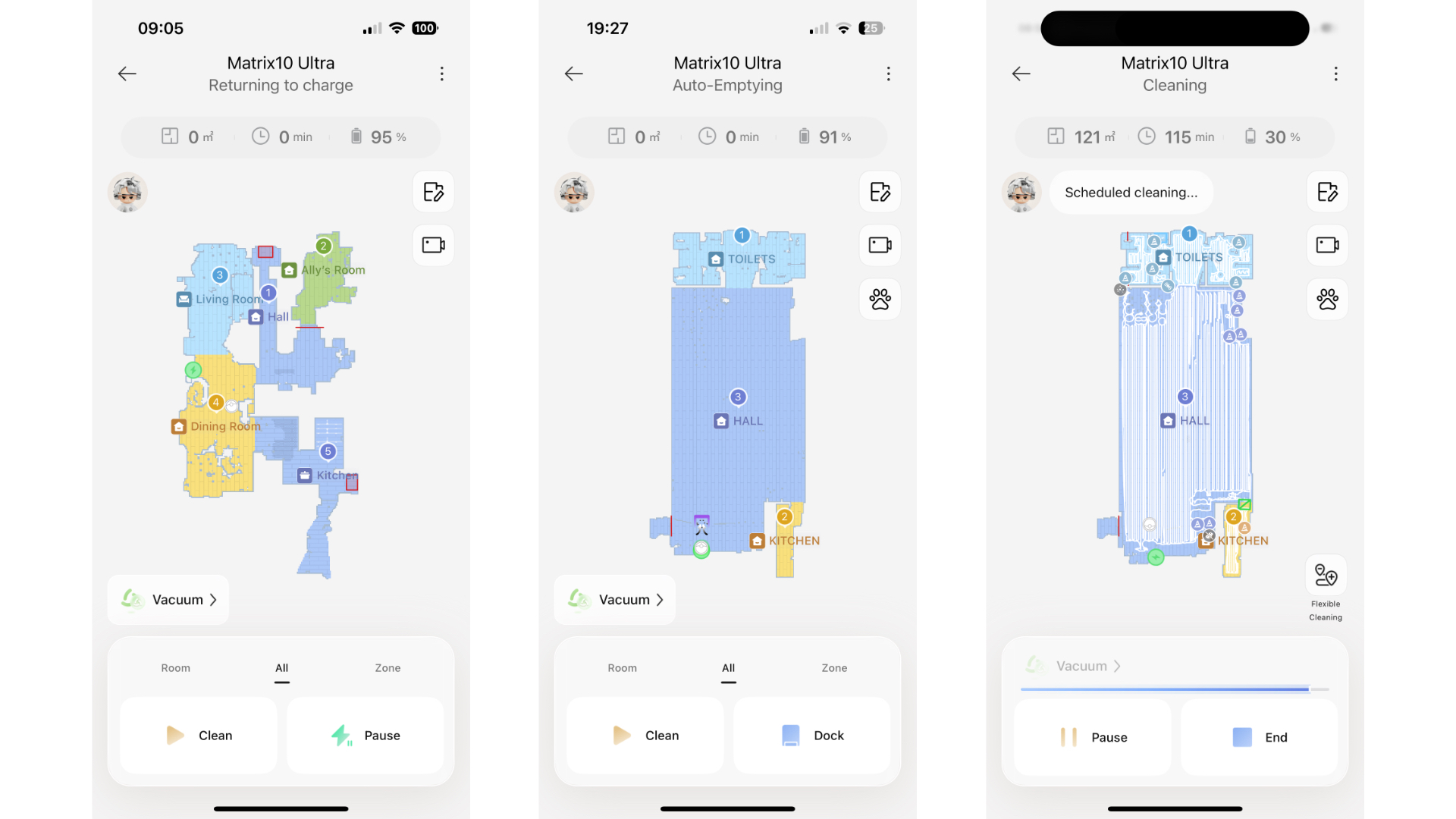
During my tests the Matrix10 Ultra has planned efficient, seemingly logical cleaning paths rather than wandering around randomly. It's also adjusted dynamically when furniture was moved or when unexpected obstacles appeared, updating its routes mid-clean to maintain full coverage without wasting time or missing too many corners.
Unfortunately I wasn't in a position to test its ability to scale high thresholds and small steps because I don't have any access to them. However, I have seen demonstrations of this bot negotiating a threshold and roll-steel furniture legs and it has simply sailed over them.
Obstacle avoidanceThe Dreame Matrix10 Ultra's obstacle avoidance is one of its most impressive performance features, combining advanced sensors and AI to navigate real-world environments with finesse. As mentioned in the Design section, the robot uses a combination of retractable DToF LiDAR for precise distance mapping and structured-light 3D sensing paired with an AI-enhanced RGB camera. This fusion of sensors allows it to detect a wide range of objects, from small items like cables, socks, shoes, bags and pet toys to furniture legs and other household obstacles.
(Image credit: Future)In practice, this means the Matrix10 Ultra rarely bumps into or gets stuck on objects, though I'll admit that a loose pair of scissors caught it out on one occasion. In my first home test, it manoeuvred between a loose glove and tape measure without any touching, but rode slipshod over the scissors; and yet it avoided the scissors in a subsequent test. I put this first failure down to the robot having approached the scissors from an acute angle beyond the line of sight of its RGB camera.
I then set up another obstacle test in the village hall using a clutch of pens, a book, a plastic Dyson vacuum nozzle and the same tape measure. Remarkably, it negotiated all obstacles without any touching and you can see this in the attached demonstration video.
Would I rely on the Matrix10 Ultra to avoid a dog poop? No I wouldn't, though on evidence of my tests, I'd say that there's a much better chance of this bot avoiding it rather than smearing it all over the carpet.
Vacuum performanceThe Dreame Matrix10 Ultra delivers very decent vacuum performance. It dual-brush system lifted dust, debris and pet hair with ease on my hard floors, while its automatic edge brushes did a grand job of scuttling debris from corners into the path of its suction portal.
It has spent two weeks vacuuming my home with no glaring signs of it having missed anything and it's been absolutely faultless in the village hall, too, with a perfectly cleaned swathe of wooden flooring and very little evidence of any forgotten debris along the skirting boards. The Matrix10’s cleaning ability on hard floor is as good as the best I’ve seen from any robot vacuum brand.
Image 1 of 3(Image credit: Future)Image 2 of 3(Image credit: Future)Image 3 of 3(Image credit: Future)However, I was a little underwhelmed by its performance on a medium-pile rug, even when I had the suction set to Max+. For this test I selected zone cleaning in the app and sprinkled a good dollop of oats, rice and small chunks of crushed dried pasta. The robot duly headed to the rug and proceeded to ramp up the suction power when its sensor detected extra debris. It then performed a series of tight circles in these areas before continuing in an up-and-down parallel fashion to finish the job.
It definitely left more debris behind than I expected, given the ultra-powerful 30,000 Pa suction spec. Despite the supposedly higher suction, it didn't perform as well on carpet as my Roborock 10R or Roborock 10 in this particular high-debris test.
Image 1 of 3(Image credit: Future)Image 2 of 3(Image credit: Future)Image 3 of 3(Image credit: Future)I am mindful that this was an extreme task and one that would normally be performed to much better effect by a human with a decent cordless stick vac. The Matrix10 Ultra's day-to-day carpet cleaning has been perfectly acceptable – the robot’s bin has always been full enough to suggest it had collected a lot of pet hair – just not quite as outstanding as I'd hoped for. At just 54.9dB from about six feet away, it's also one of the quietest bots I've ever tested.
Mopping performanceThe Matrix10 Ultra's mopping is genuinely among the most advanced of any hybrid combos. Its rotating Dual Omni‑Scrub mop technology applies consistent downward pressure, scrubbing hard floors deeply rather than simply swiping across them. Moreover, the base station supports a full cycle of mop‑pad care – heated water washing, drying and automatic water refill of the robot's smaller water tank. This level of automation keeps the mop pads hygienic, fresh and ready for repeated cleaning, without any manual scrubbing or pad wringing.
(Image credit: Future)Of course, one of this model's most clever touches is its ability to switch mop pad types automatically, depending on what the space demands. Water flow is also regulated automatically depending on floor type and expected dirt levels, which helps avoid over‑wetting.
In my daily tests, the mopping system delivered smooth, even results with no streaking. It also handled a spill of some milk with no issues to report. However, no hybrid robot is flawless when it comes to removing deeply ingrained grime, thick stains or sticky messes.
(Image credit: Future)While this model will tackle them to some degree, programming it to head to a specific spot by creating a zone in the Dreame app is a world of pain and takes more time to set it up and the robot to perform the task accurately enough than it does to simply grab a mop, kitchen towel of a decent cordless hard floor cleaner like the excellent Roborock F25 Ultra.
Dock performanceAs previously mentioned, rather than just charging the robot, the Matrix10 Ultra's dock stores three sets of mop pads and automatically selects the correct one for each room. It also washes them in 212F / 100C water before drying them with hot air. The jukebox-style pad selection system is undeniably clever, but I can't comment on the long-term reliability of this complex mop-swapping innovation. I should add that I personally haven't experienced any issues, but who knows how well it will behave in a year or two.
(Image credit: Future)What I will wholeheartedly praise is the dock's excellent bin emptying system. I've often experienced issues with some robot vac docks that have clogged up when faced with too much pet hair in the robot's smaller bin. To date this model has performed immeasurably well and I think I know why.
A bit like the Eufy Omni S1 Pro, this model's dock goes through a pre-suction process whereby it performs a full power suck for about a second to loosen any clumped hair in the robot's bin before pausing another second. It then goes into full suction for about 8 seconds. After umpteen emptying sessions, I have no blocked suction tubes to report and that's a major bonus in my book.
(Image credit: Future)Another point in this dock's favor is the low volume it emits while going through the emptying process. I measured it at 64.2dB from about 10 feet away and this is pretty quiet for a dock of this nature. But perhaps more importantly, the low sound frequency of the emptying process is so much easier on the ears than many other docks, specifically some of those by iRobot which emit an ear-splitting high-frequency scream whenever emptying the contents of their robots' bins.
Battery performanceI was initially concerned about this model's battery capacity when first putting it through its paces. I'd fiddle with it for no longer than 10 minutes with pauses in between and the battery would show something in the region of 91%. Hence I didn't hold out much hope of the battery lasting for an entire vacuum clean of a 121-square meter village hall without having to recharge midway through the cleaning session.
But I was wrong, because I've checked the Dreame app's Care History section and, on average, the Matrix10 Ultra has completed every task – the hall, kitchen and toilets – in one go in around 117 minutes with +/- 28% of battery life remaining. And that's a very reassuring stat for anyone thinking of purchasing this autonomous hybrid vac for their country mansion.
- Performance score: 4.5 out of 5
- Extremely comprehensive
- Slowish to respond
- Not that easy to navigate
The Dreame app offers a highly capable and feature-rich experience, giving users minutely detailed control over their robot vacuum and mop. From the first LiDAR scan, it builds an accurate map of your home, allowing you to name rooms, create zones, set no-go zones, create multi-floor maps and adjust cleaning parameters like suction strength or mop water flow rates on a per-room basis. Scheduling, remote control and notifications help keep cleaning convenient, while smart-home integration with Alexa, Siri and Google Assistant adds hands-free flexibility.
Click to enlarge (Image credit: Dreame / Future)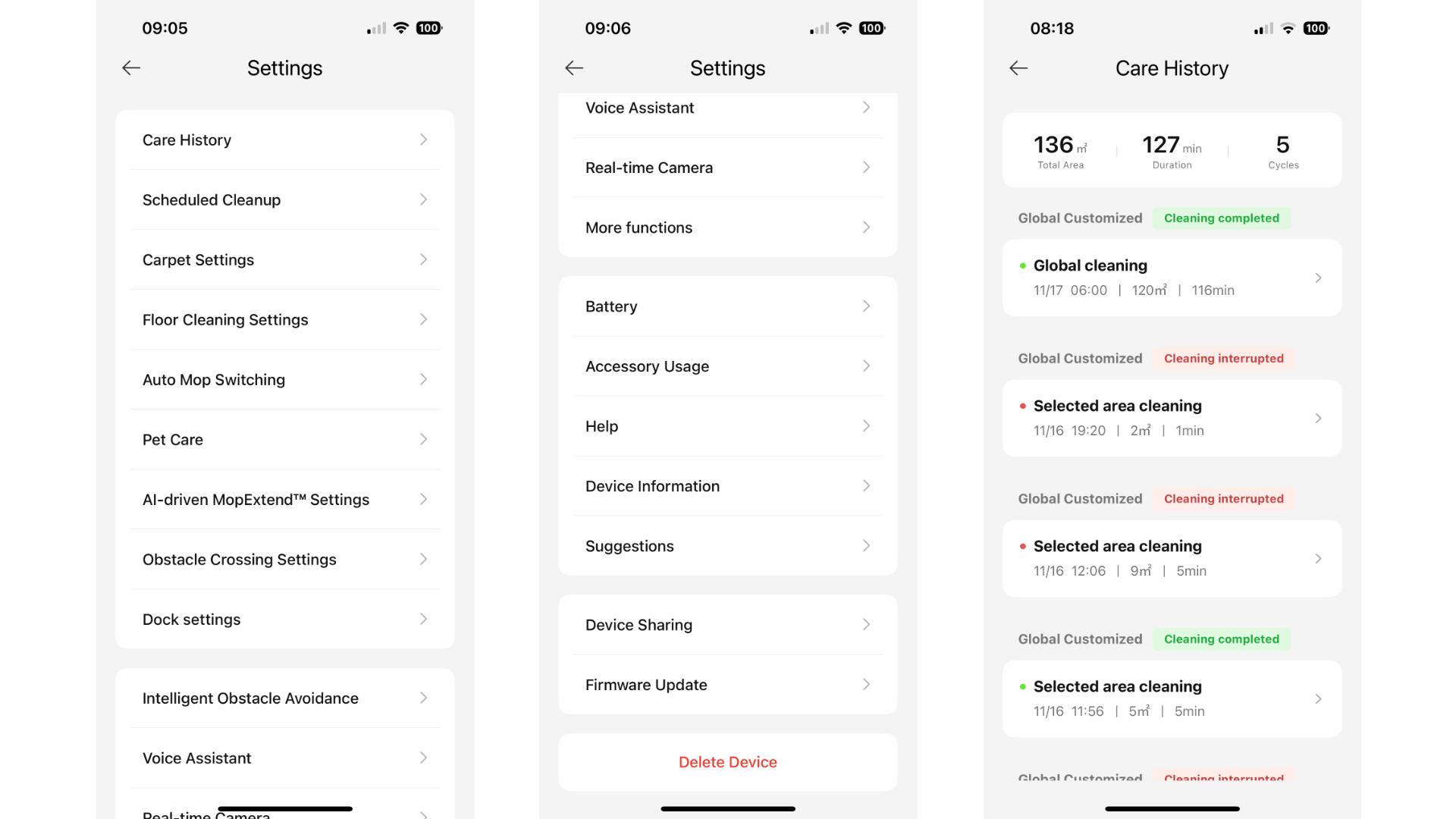
However, it took me a while to get a handle on this app and an especially long time to work out how to set up routines. Even then, I needed to make sure I'd saved and tapped on any tick icons or it didn't save anything. I'd have preferred to see a system like that adopted by Roborock which saves its routines (a series of pre-programmed short cuts like ‘vacuum the hall', ‘mop the kitchen' and ‘clean the dog rug') on the homepage for instant accessibility. I've also noticed that the Dreame app is a bit slower to react to commands and send them to the robot – but we're talking seconds here.
Despite these small niggles, I've been mightily impressed by the huge wealth of customisation you can achieve in this app. However, I would advise spending a good deal of time learning about all the settings because, by ignoring them, you almost certainly won't get the most out of this sterling autonomous home helper.
- App score: 4 out of 5
Attribute
Notes
Rating
Value
Ultra-premium at list price, but it looks like discounts won't be hard to come by – and it does boast an awful lot of tech.
3.5 / 5
Design
Ambitious and complex, with a mop-pad dispensing dock, feet for vaulting over steps and a retractable LiDAR puck.
4.5 / 5
Performance
Generally extremely impressive, with excellent mopping and hard floor vacuuming, and accurate navigation and object detection. Its carpet performance not as outstanding as I'd expect for those suction specs.
4 / 5
App
Perhaps a little too comprehensive for its own good – technophobes may have trouble getting a handle on it.
4 / 5
Buy it if...You have advanced mopping needs
The Matrix10 Ultra really shines when it comes to its mop setup, with multiple mop types and cleaning fluids (and the ability to swap between them automatically).
You're worried about cross-contamination
The Matrix10 Ultra provides different mops for different rooms, to keep things contained.
You have a big home with lots of obstacles
This model delivers some of the most accurate and efficient mapping and navigation I've experienced – perfect for large, challenging spaces.
Don't buy it if...You don't have much room for the dock
The Matrix10 Ultra's dock is about the size of a small fridge, so not ideal if you're short on space.
You don't need auto mop pad swapping
Is the specter of cross-floor contamination really an issue? If you're not fussed about reusing your bathroom mop pads in the kitchen (with a clean in-between), there are plenty of cheaper and simpler alternatives to choose from.
You don't have that much hard floor
The USP here is really the mopping – if you're not going to be making the most of the different mop pad types and cleaning fluids, I'd pick a different bot.
How I tested the Dreame Matrix10 UltraI've had this model running on two separate floor spaces – at home and our large village hall, where it currently resides. Aside from evaluating both the robot and unique mop-swapping dock, I let it loose at home for two weeks and left it to its own devices using a series of daily cleaning schedules. I then performed a hard-floor pick-up and mopping test in the kitchen before hauling it up to the hall (it's heavy) where I performed a carpet cleaning and obstacle avoidance test before leaving it to run five scheduled vacuum and mopping sessions per week. It's been doing this for the past two weeks with no hiccups to report.
Read more about how we test robot vacuum cleaners
- First reviewed December 2025
Categories: Reviews
Dreame's new mop-swapping robot vacuum is the most innovative and ambitious robovac I've ever tested
The Dreame Matrix10 Ultra might be the perfect bot for big, complex homes or even commercial properties.
Categories: Technology
AI browsers are rewriting the rules. Is your security keeping pace?
Agentic AI browsers enable sophisticated attacks through prompt injections that steal credentials without detection traces.
Categories: Technology
NYT Connections hints and answers for Friday, December 5 (game #908)
Looking for NYT Connections answers and hints? Here's all you need to know to solve today's game, plus my commentary on the puzzles.
Categories: Technology
Quordle hints and answers for Friday, December 5 (game #1411)
Looking for Quordle clues? We can help. Plus get the answers to Quordle today and past solutions.
Categories: Technology
NYT Strands hints and answers for Friday, December 5 (game #642)
Looking for NYT Strands answers and hints? Here's all you need to know to solve today's game, including the spangram.
Categories: Technology
Microsoft quietly patches LNK vulnerability that's been weaponized for years
The November Patch Tuesday fixed an age-old bug being exploited by nation-states.
Categories: Technology
FBI arrests suspect in investigation into pipe bombs planted near DNC, RNC before Jan. 6 attack
The FBI has spent years searching for the person who put bombs near the Democratic and Republican committee headquarters, hours before the assault on the Capitol on Jan. 6, 2021.
(Image credit: MANDEL NGAN)
Categories: News
Proton launches new end-to-end encrypted spreadhseets for ultra secure data handling
Proton Drive now has Docs and Sheets to ensure maximum data security across key workflows.
Categories: Technology
Samsung's next-gen OLED TVs leak, including a mysterious new elite model
A Samsung leak seems to have revealed new models and sizes
Categories: Technology
Start 2026 strong - you can save up to 50% on Wix’s top apps right now
Over 450 of Wix’s best apps are on sale right now, with discounts ranging from 20% to 50%
Categories: Technology
Missed Black Friday? Fear not, as PS Plus members can still get an extra 5% off at PS Direct – including sale items
You can get an extra 5% off with PS Plus at PS Direct in the UK.
Categories: Technology
Pages

Custom Search